Back to the index · Previous: Lake targets and formats
How it works#

Delta Lake is a trademark of LF Projects, LLC. Apache, Apache Iceberg, Iceberg, Apache Parquet and Parquet are trademarks of The Apache Software Foundation. The logos identify the open formats DataSimple reads and writes.
DataBridge copies a whole database, selected tables, a folder of exported files, a restored backup or a set of Kafka topics into the lake, in Parquet, Delta and Iceberg, and registers every copy in Unity Catalog under datasimple.source. The first run of a table is a full load. Later runs bring only what changed, and how "changed" is found is the load method: a watermark column, the database's own change log, new files in a drop folder, a new backup file, or the next Kafka offsets. Every row receives bookkeeping columns (_load_ts, _batch_id, _op_type, _is_deleted, …) so you can always tell when, how and by which run a row arrived. After the copies are written a run can also merge the batch into Bronze (one row per key) and into Silver (current state and history); the position of a change log or topic is advanced only after those writes succeed, so a failed run is retried by the next one.
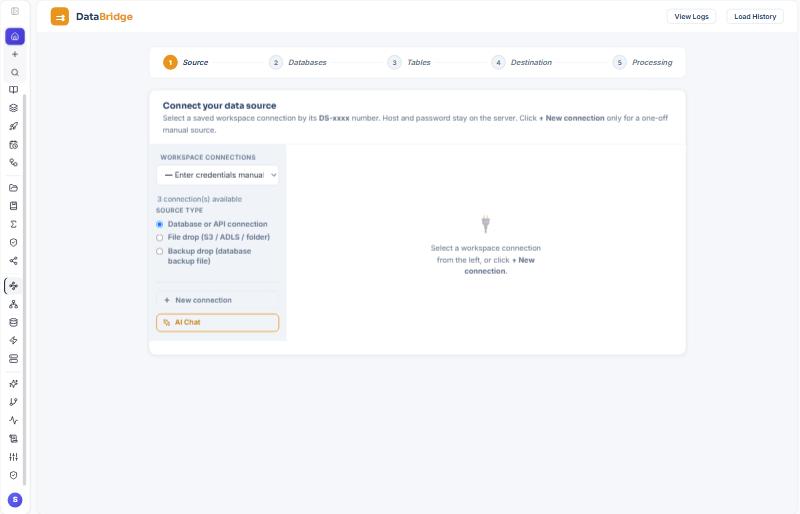
The five steps#
- Source. Pick the radio: Database or API connection, File drop (S3 / ADLS / folder), Backup drop (database backup file). Choose a saved
DS-xxxx(or type credentials and a Source Name, which becomes the folder in the lake). Connect and discover databases. - Databases. Tick the ones you want. A connection that names a database goes straight to step 3. The database you pick is the one read, also when the saved connection names another one as its default; the server, user and password always come from the saved connection.
- Tables. Open a schema, tick tables, or All / None. already loaded marks a table that exists in the source layer from this system; loading it again is an incremental run.
- Destination. Target (the saved
Target_AWS/Target_Azure/Target_GCP), Process with (DataBridge engine, or Spark box for very large tables), Source layer formats (Parquet, Delta, Iceberg), Change detection on later runs, Apply changes to Silver (MERGE), Auto-apply to Bronze CDC after extract (on by default), Parallel threads, and Check keys & watermark. - Processing. Start processing. Each table shows its phase; when it finishes, the dashboard reads the row counts back from every format and compares them with the source (Match). Repeat every … schedules the same load.
Drag & drop copy#
The quick way to load a database or some tables: four steps, no columns to pick. It uses the same copy engine, so the copies land under the source system's name (the saved connection's name), carry the same bookkeeping columns (_load_ts, _batch_id, _op_type, _is_deleted, _row_hash), are registered in the catalog the same way, and every run is in Load History.
- Pick the source. In DataBridge click ⇄ Drag & drop copy (top right) and choose a saved
DS-xxxxdatabase connection. Its databases appear on the left. Source system shows the connection's name: the copies are kept under it. The Destination is the saved target. - Drag. Click a database to see its tables and row counts. Drag a database (all its tables) or a table onto DataSimple on the right, or use the ➜ button next to it.
- Pick the formats. Parquet, Delta and/or Iceberg. With Delta or Iceberg a Parquet copy is written too, because Bronze is built from it.
- Copy. Each table shows its progress, then ✓ rows or ✗ error (hover for the reason). Copy again brings the changes since the last run.
How changes are found: decided for you#
When a table is dropped, DataBridge checks it and labels it. The line under the lists counts them, for example 142 tables: 12 CDC · 38 Delta · 92 Row hash.
| Label | When | Later runs read | Deletes |
|---|---|---|---|
| CDC | the database's change log is on for the table (SQL Server CDC, PostgreSQL logical decoding) | only the inserts, updates and deletes the database recorded | yes, from the log |
| Delta | the table has a primary key and a change column (modified_at, updated_at, last_update, a row version, …); a business date such as order_date is never used |
rows changed since the last run | checked once a day by comparing keys |
| Row hash | everything else | the whole table; only new, changed and removed rows are applied, found by comparing each row's SHA-256 hash (_row_hash), by key when the table has one |
yes, by comparison |
Deletes. CDC tables get deletes from the change log, and Row hash tables from comparing the whole table, on every run. For Delta tables DataBridge compares the source's keys with Bronze once a day and marks the missing ones _op_type = D, _is_deleted = true; the row stays in Bronze with its last values. If more than 20 % of a table's keys look deleted, nothing is recorded and the run's note says so: that usually means a bad source read, not real deletes. A table without a key records a changed row as the old row deleted plus the new row inserted.
Time travel. Bronze and the Delta copies keep their versions. In a SQL cell, DESCRIBE HISTORY bronze.<table> lists them and SELECT * FROM bronze.<table> VERSION AS OF 0 shows the table as the first run wrote it (TIMESTAMP AS OF '…' works from the first version's time on).
The first run of every table copies it whole. Nothing to choose: hover a label to see why it was chosen. To pick a key or change column yourself, add Silver merges or schedules, use the five steps below.
Load methods#
| Method | What a later run reads | Sees deletes | Position kept | Use it when |
|---|---|---|---|---|
| Full load every run | the whole table; copies replaced (merged by key when a key exists) | yes, by comparison (keys missing from the snapshot) | none | small tables, or no change column and no change log |
| Watermark column | rows whose watermark (updated_at, change_seq, …) is past the last value |
only with Detect deletes on (below); Salesforce also from IsDeleted |
the last watermark value | any database with a reliable change column |
| Database change log (SQL Server CDC, PostgreSQL logical decoding) | only the inserts, updates and deletes the server recorded since the last position; first run = full snapshot with the position taken before the read | yes | __cdc_lsn (SQL Server LSN, or the PostgreSQL WAL position) |
SQL Server tables with CDC enabled; PostgreSQL 13+ with wal_level = logical |
| File drop | files not seen before in <folder>/<TABLE>/ (tracked by object and ETag); modes merged by key, added, the whole table (snapshot) |
yes, with a delete-marker column (op = D / DELETE) or snapshot mode |
the file ledger | the client exports tables as Parquet, CSV or JSON |
| Backup drop | the newest backup file, restored into a throwaway database on the restore worker and loaded like a live connection | yes, keys missing from the new backup become deletes in Bronze | none (each backup is a snapshot) | the client can only hand over .bak, Db2 image, pg_dump or mysqldump files |
| Kafka (stream) | the messages between the stored offsets and the end of each partition, as a micro-batch; first run from earliest or latest | yes, from the op field (D/DELETE) or the Debezium op |
__kafka_offsets per topic ({"0": 6, "1": 6, "2": 8}) |
a topic already carries the changes (JSON, Debezium envelope, CSV, raw) |
Every table's load type, watermark column, committed high watermark and last window are kept in load control (Load History → Load control, and the Bronze loads screen): a delta reads (from, to] past the committed value (minus an optional lookback for timestamps), a failed run leaves the position where it was, a run with zero rows still moves the window, and two runs never load the same table at once. Reset to initial, lookback and disable are buttons there; the rules and the two tables are in DELTA-LOADS.md.
Automatic (the default for Change detection) picks the change log when the table is tracked, else the watermark column if one is set, else a full load. Oracle (LogMiner) and MySQL (binlog) change-log CDC: not yet; under Automatic they fall back to watermark or full load.
Detect deletes (watermark runs)#
A watermark run reads only rows changed since the last run, so a row deleted at the source simply stops arriving. Detect deletes on later runs (step 4, and per schedule under Load History → Schedules) closes that gap. It is off by default; the choices are After every run and Once a day.
When it is on, after a successful incremental run of a table, DataBridge:
- reads the source's current key set (only the key columns for SQL Server, PostgreSQL, MySQL, Oracle and the other SQL drivers;
SELECT Id FROM <object>for Salesforce; a full read projected to the keys for MongoDB, SAP OData, API sources, Snowflake and HANA); - compares it with the keys that are live in the Bronze change log (the folder
bronze/…/<table>/cdc/: keys whose last event is not a delete); - appends one delete event per key that is live in Bronze and gone from the source: the row's last known values with
_op_type = 'D'and_is_deleted = true, the same shape the full-load comparison writes. A Silver table built from the change log (ds.apply_changes/APPLY CHANGES … APPLY AS DELETES WHEN _op_type = 'D') acts on it like any other delete. DataBridge's own Apply changes to Silver option merges the run's batch only, so it does not receive these key-comparison deletes yet (it does receive SalesforceIsDeletedrecords, which are part of the batch).
No Bronze row is ever removed or changed; the events are appended. A key that is already deleted is not deleted again.
Safety limits. Nothing is recorded, and the table result shows Deletes: not recorded (…) with the reason, when:
| Case | Why it is refused |
|---|---|
| the table has no declared primary key | without a key there is nothing to compare; the check is skipped |
| the source key read fails | a failed read must never look like "everything was deleted" |
| the source returns no keys while Bronze has live rows | an empty source or the wrong environment looks exactly like that |
| more than 20 % of the live keys would be deleted | setting max_delete_ratio (per load or schedule, 0–1) or DATABRIDGE_MAX_DELETE_RATIO; exactly the limit is allowed |
A refused or failed check never fails the load; the next run (or, for Once a day, the next run after it) checks again. The check runs on the DataBridge engine with Parquet Bronze and Enable watermark + CDC (the change log it compares with); it is not offered for staging-only, bulk or routed loads. A table whose Bronze is Delta or Iceberg (transactional Bronze, no change log) is skipped with the note needs the Bronze change log.
Where the result shows. The table line in Load History reads Deletes: 3 recorded, Deletes: none, or Deletes: not recorded (…); the job's table result carries delete_capture (status ok / in_sync / refused / skipped / not_due / error, deletes, live_keys, source_keys, delete_ratio, message). Load History → Schedules shows the setting and the newest check per table.
Salesforce deleted records. With Detect deletes on, an incremental run of a keyed Salesforce object reads with queryAll, which also returns records in the recycle bin (IsDeleted = true); each such record becomes a delete event for its key (ignored when Bronze never had it). Use SystemModstamp as the watermark: it changes when a record is deleted, LastModifiedDate does not. Declare Id as the key under Choose key & watermark…. Records purged from the recycle bin before a run saw them are found by the key comparison. With the option off the plain query is used, exactly as before.
Rows with an empty watermark#
A row whose watermark column is NULL (or missing) is read by the first full load and then by no watermark run. Also read rows whose watermark is empty (step 4; API include_null_watermark: true) adds "or the watermark is empty" to every delta read. It applies only to tables with a declared key: those rows are read again on every run and merged by key (unchanged rows add nothing to Bronze). For a table without a key the option is ignored, because each run would append the same rows again; the table result says so.
| Source | How "empty" is asked |
|---|---|
| SQL Server, PostgreSQL, MySQL, Oracle, generic SQL drivers, BigQuery, Snowflake, HANA | (col > since OR col IS NULL) |
| MongoDB | {"$or": [{col: {"$gt": since}}, {col: null}]} (a null and a missing field) |
| Salesforce | (col > since OR col = null) |
| SAP OData | $filter=(col gt since or col eq null) |
| Backup drop | the restored database's connector (one of the SQL rows above) |
| API sources (declarative REST specs), Camel | not supported: the API filters on its own since parameter and cannot be asked for empty values. The option is left off and the table result says so |
Change-log CDC, what the database side needs#
SQL Server (a DBA, once): EXEC sys.sp_cdc_enable_db; then EXEC sys.sp_cdc_enable_table @source_schema = N'dbo', @source_name = N'Orders', @role_name = NULL, @supports_net_changes = 1; with the SQL Server Agent running; the connection user needs SELECT on the table and on the cdc schema. Keep the CDC retention (default 3 days) longer than the longest gap between runs. After a longer gap the change log no longer reaches the last run: the table is then copied in full on its own, its log position starts again from there, and the table's note says so; the Bronze merge by key and row hash brings Bronze back in line, deletes included.
PostgreSQL: ALTER SYSTEM SET wal_level = logical; (restart), ALTER ROLE <user> WITH REPLICATION;, optionally ALTER TABLE public.orders REPLICA IDENTITY FULL; for full row images on deletes. DataBridge creates one replication slot per tracked table, datasimple_<database>_<schema>_<table>, on the first run with Database change log chosen. A slot makes the server keep WAL until the table is run again; drop the slot (SELECT pg_drop_replication_slot('…');) when you stop loading a table, and set max_slot_wal_keep_size as a cap.
File drop, what the client drops#
<folder>/CUSTOMER/full-001.parquet          first load
<folder>/CUSTOMER/inc-2026-10-14.parquet    later: changed rows only, with the key and an op column
<folder>/CUSTOMER/_SUCCESS                  optional: "this folder is complete"
<folder>/REGION/region.csv
One sub-folder per table. A file still changing in the last two minutes waits for the next run. The same file dropped again unchanged is ignored (same ETag); the same name with new content is read again. A change time column fills _source_ts.
Kafka, per-load fields#
Topics (comma list) or a topic pattern; message format JSON, Debezium envelope, CSV, Raw; Key field(s) (blank = every message appended, no updates or deletes); op field and delete values (prefilled op / D,DELETE; fixed op / d for Debezium); timestamp field (kafka_timestamp default, ts_ms for Debezium, or a field of the message); start from earliest or latest; max messages per run (default 1,000,000, plus a 120-second limit; a run that stops early reports (behind) with the remaining lag and the next run continues). The picker shows messages waiting per topic; the key check line reads Kafka: 3 partitions · 20 messages waiting · key order_id · format JSON. Several messages for one key in a window collapse to the last one.
Keys, and "Check keys & watermark"#
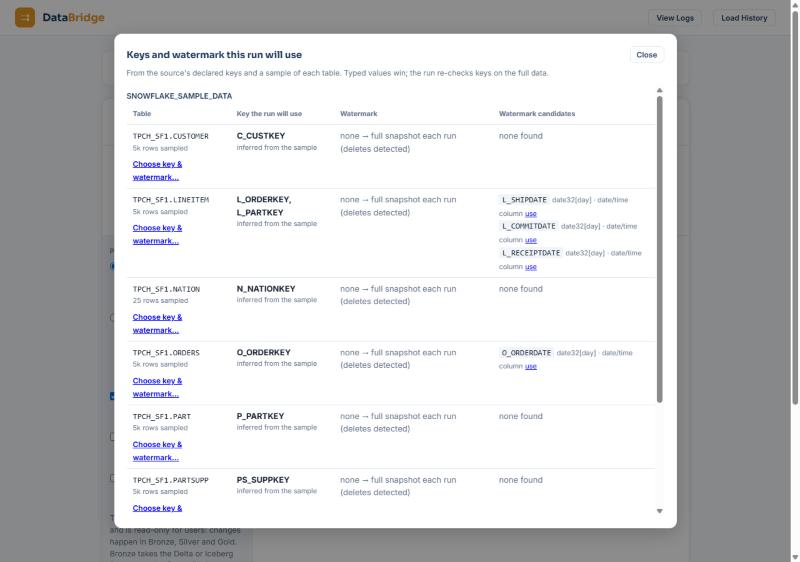
Every merge (incremental copies, Bronze, Silver) needs a key. Check keys & watermark on step 4 opens a window with, per table: the key the run will use (declared by the source, inferred from a sample, or chosen by you under Choose key & watermark…), the watermark column, watermark candidates with a use link, and the change-log status (CDC: tracked (capture dbo_Orders), CDC: off, or for PostgreSQL CDC: available (no slot yet) / CDC: tracked (slot …, 12.0 MB WAL retained)). A table without a key is loaded; the merges are skipped with a note.
Parallelism and very large tables#
Parallel threads is how many tables run at once. Memory slots keep the process inside its budget whatever you choose: big tables take turns or are streamed, small ones never wait. For very large tables pick Process with → Spark box (bulk); the bulk path writes the formats on Spark and registers <T>_DELTA / <T>_ICEBERG the same way. Bronze auto-apply is off for bulk runs.
Large tables with a watermark or change log#
- The first load is streamed when the table is too big to hold in memory (the memory plan says so, or the source's row estimate is at least
DATABRIDGE_STREAM_ABOVE_ROWS; 0, the default, leaves it to the memory plan). This now includes tables with a watermark or change capture on. The rows are read in batches and written to local disk as they come; the CDC Bronze snapshot (every row an insert) is written from the same file. The watermark, or the log position, is stored only after every file is written. A failure on the way stores nothing, and the next run loads the table again. - When it still runs in memory: S3 targets only (ADLS keeps the in-memory path), a connector that can read in batches, no CDC Bronze for the table yet, and Apply changes to Silver set to none. Otherwise the run uses the in-memory path as before.
- The Parquet copy is part files for these tables:
source/…/<table>/parquet_parts/<generation>/. With a key the rows are spread over bucket files by a hash of the key (about 64 MB each,DATABRIDGE_PARQUET_BUCKET_MB). Without a key each batch is one more part file. The catalog entrydatasimple.source.<schema>_<table>points at the folder, and Spark reads every part. - An incremental run rewrites only what it touches. With a key, only the bucket files the batch's keys fall into are rewritten. Without a key, one new part file is written. The old way read and rewrote the whole copy in memory.
- Readers never see a half-written copy. A full load writes a new generation folder, and the table switches to it only after every file is uploaded. One earlier generation is kept for queries already running; older ones are removed.
- A new column, a changed type or a different key rewrites the generation once, the same way as a full load.
- Existing tables: a table whose copy is still one file (
parquet/<TABLE>.parquet) moves into part files on its first incremental run that is too big to merge in memory. Its rows are streamed into the new generation together with that run's batch. The old file is left where it is. Small tables keep the single file and the in-memory merge exactly as before. A full load that runs in memory writes the single file again. - Settings:
DATABRIDGE_PARQUET_PARTS=offnever creates part files; a copy already in parts keeps working.DATABRIDGE_STREAM_FULL_LOAD=1streams every full load, as before.
Fast reads, and no row left behind#
- The table's size is known before the read. DataBridge takes the row count from the source's catalog statistics (Db2 included). A table without statistics is counted with
COUNT(*)when the run has up to 50 tables (DATABRIDGE_COUNT_UNKNOWN_MAX). A big table therefore starts streamed, or on Spark, instead of being read into memory, stopped and read again. - One table is read on several connections at once. When the table has a single-column integer key (or the job option
read_partition_columnnames an integer column), the key is split into ranges: 4 by default (job optionread_partitions, orDATABRIDGE_READ_PARTITIONS). Each range is read on its own connection. This works for SQL Server, PostgreSQL, MySQL/MariaDB, Oracle, Db2 and the other SQL drivers, in memory, streamed and in the bulk staging.- The first range has no lower bound and the last none above, so a row outside the key's range at the start is still read.
- A column that can be empty gets one more range for its empty values.
- The ranges never overlap, so no row is read twice.
- If one range fails, the whole read fails. A partial table is never written as if it were whole.
- Db2 sends rows in blocks. The read uses a read-only cursor, so Db2 returns many rows per network round trip. This changes how rows travel, not which rows are read.
- The row count is checked after every full read. The rows read are compared with the source's
COUNT(*):- On a mismatch, the table fails with both numbers. In memory and in the bulk staging this happens before anything is written. On the streamed path it happens before the load position is stored, so the next run reads the table again.
- Watermark and change-log runs are not counted this way.
DATABRIDGE_ROW_COUNT_CHECK(or the job optionrow_count_check) sets the mode:fail(default),warnoroff.- A source that is written to during the read can end with more rows than were read. Run again, or follow the full load with a change-log or watermark run.
- The network is often the limit. Read speed can't be faster than the link between the source and DataSimple. A database reached through an SSH tunnel to a laptop is limited by that laptop's upload speed. To measure realistic times, test against a database on the same network or cloud region, or compress the tunnel (
ssh -C).
Schedules#
After a run, Repeat every … (5 minutes to daily). Load History → Schedules lists repeating loads with Pause, Run now and Delete, and a Detect deletes choice (Off, Every run, Daily) with the newest delete check of each table under it. A schedule keeps every wizard field (tables, formats, change detection, Silver option, Kafka fields) and only the numbers of the Data Sources; brokers, hosts and passwords are resolved from Data Source at every run.
Load History and the phases#
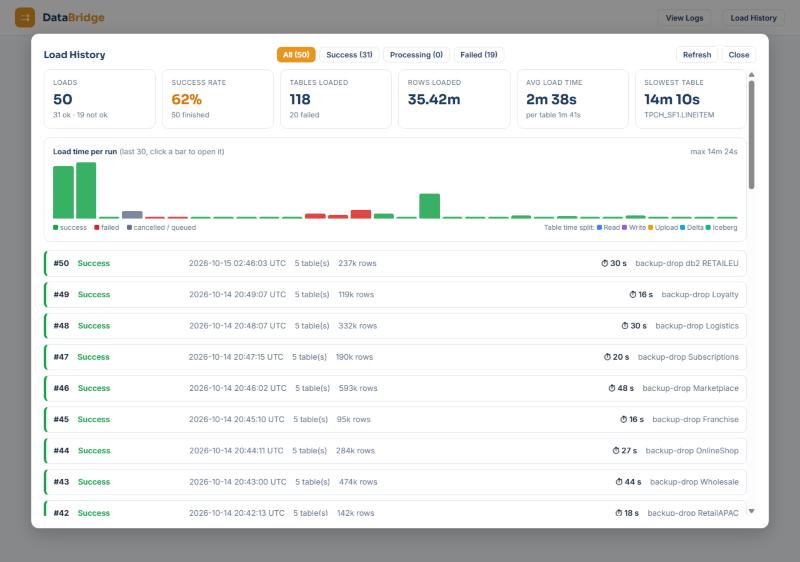
Load History (top right) lists every run with its tables, formats, rows and the time split per step (read, write, upload, Delta, Iceberg). While a job runs each table shows its phase: reading, preparing rows, uploading Parquet, writing Delta, writing Iceberg, applying changes (MERGE) to silver. Stop job stops the whole run; the stop link next to a table stops that table only. Finished tables show Match, Merged (an increment merged by key), Mismatch (counts differ; run again) or an error with its reason. For a change-log table the line reads Change log (snapshot) LSN — → 04D80003 on the first run and cdc I 1 · U 1 · D 1 later; for a topic Kafka: 3 messages (3 partitions) · lag 0 · I 1 · U 1 · D 1 · offsets {…}; for Silver Silver: +1 ~1 -1 · history +2.
Read only what changed in Silver (Change Data Feed)#
Silver tables that Apply changes to Silver writes in Delta format record Delta Lake's Change Data Feed (part of open-source Delta Lake). A job that builds Gold from Silver can then read only the rows that changed instead of the whole table. New Silver tables have it from their first run; a Silver table made before this has it switched on at its next merge, and its feed starts from that merge.
In a SQL cell:
-- every change since version 5 of the table
SELECT _change_type, _commit_version, _commit_timestamp, *
FROM table_changes('silver.dbo_customers', 5);
In a Python cell:
changes = (spark.read.format("delta").option("readChangeFeed", "true")
           .option("startingVersion", 5).table("silver.dbo_customers"))
_change_type |
Meaning |
|---|---|
insert |
a new row |
update_preimage |
the row before an update |
update_postimage |
the row after an update |
delete |
a removed row |
DESCRIBE HISTORY silver.dbo_customers lists the versions. Silver tables written in Iceberg format do not have this feed.
What each run writes#
| Output | Where | Name | |||||||||
|---|---|---|---|---|---|---|---|---|---|---|---|
| source copies | source/<Source Name>/…/<table>/{parquet,delta,iceberg}; a large incremental table's Parquet copy in …/<table>/parquet_parts/<generation>/ |
`datasimple.source.
Same table name from two source systems. Catalog names do not contain the source system, so two sources can bring a table with the same schema and name (two connections to one server, or two systems that both have Tables loaded before this rule existed can have the problem the other way round: the catalog describes one source's table while a query opens the other's. An administrator finds and repairs those entries with the catalog repair (Help: DataBridge → Monitoring and troubleshooting). It renames only catalog entries; no data moves. Bookkeeping columns written here#
The API#HTTP File drop over a saved storage target: Read more#
Next: 5. Bronze Type to search every chapter: titles, sections and text. ↑ ↓ to moveEnter to openEsc to close |